Vortenia builds custom software: operational tools, dashboards,
automations, and apps for businesses and teams that run on
spreadsheets and manual work. The tools here were built and proven
inside a real operation, then shaped by the work over time.
Running dailyFounder-ledAI in productionShips real tools
This is our software, running a real floor right now.
Nothing here is a mockup, and it is not one product. The bench
auditor and the inventory system below were each purpose-built for
their own job inside an operation we run ourselves: different
problems, different faces, same studio. That is the point. Yours
would be built around your workflow, not adapted from someone
else's platform.
● Drive → Floor★From USB probe to floor, automaticallyBoot any laptop from the Vortenia USB probe. It self-audits, grades every part, and lands on your management wall on its own. No re-keying.● Live01Bench: hardware audit & grading, liveGrade every unit, flag defects, track the whole floor. The actual software, running. Case study →02Built for speed on the floorScan, confirm, next unit. Instant feedback at every station, and every move lands in an item history you can trust.
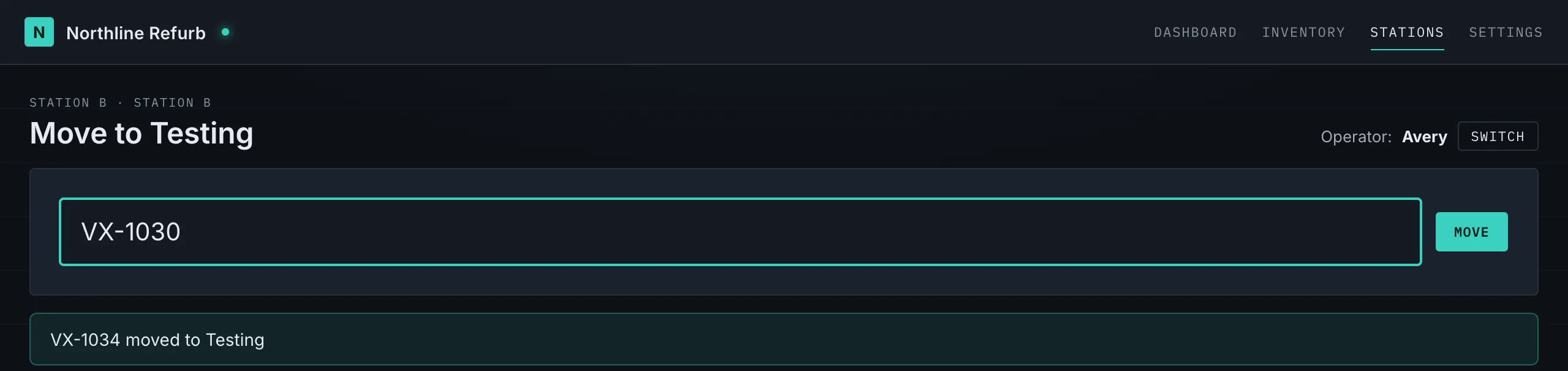
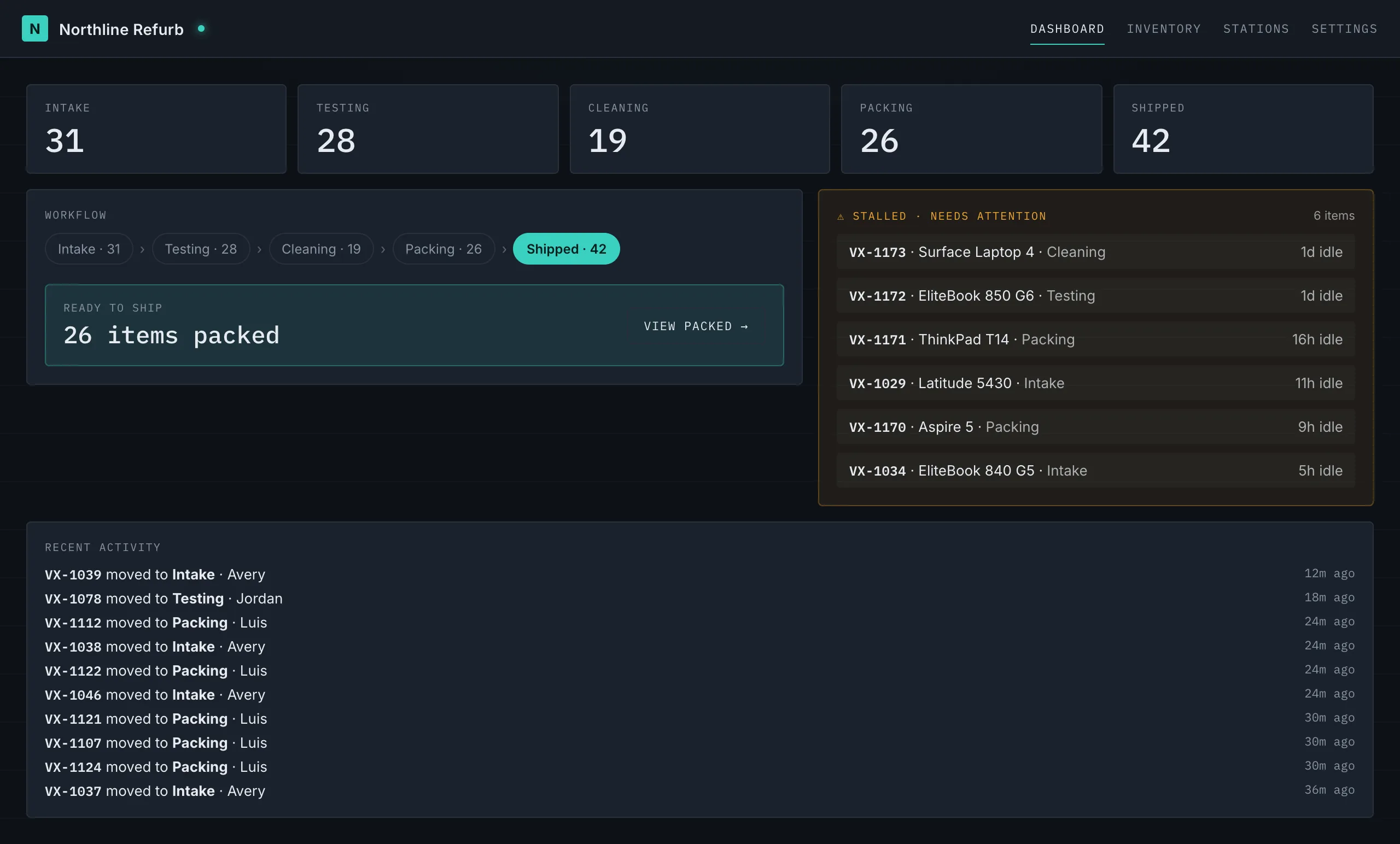
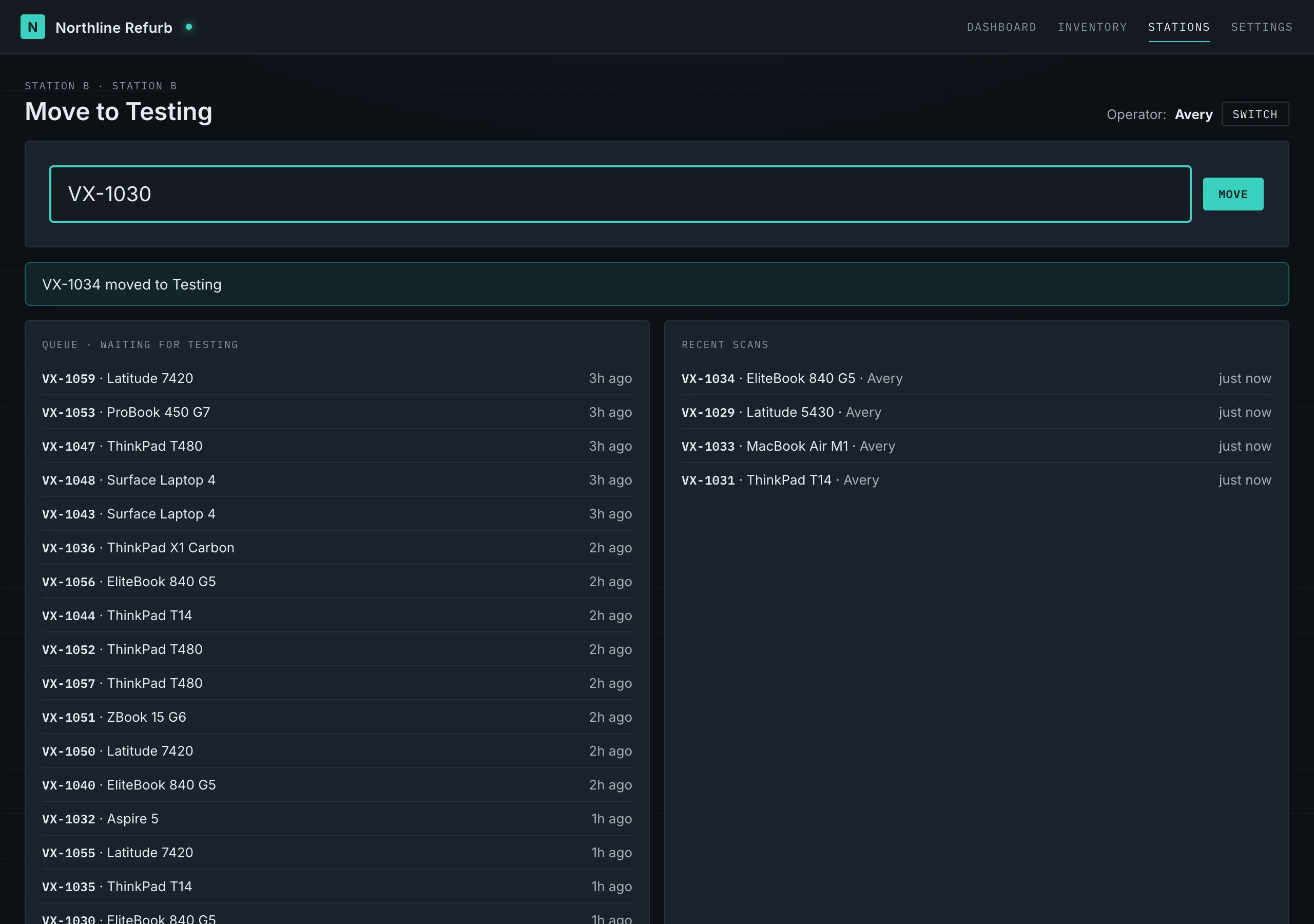
Not a video. Try it.
The board below is the real floor interaction, running on canned data. Scan a unit and watch it move a stage: the counts tick, the activity feed updates, the queue advances.
These came out of a real refurb operation, but the approach is the
point, and it applies to any business drowning in manual work:
understand the workflow, then build the software that fits it.
Intake, audit, dashboards, automation, bench tooling, and the
reporting layer around it.
→ 01
Operations Platform
The web layer that keeps floor work visible.
Dashboards, role-based views, scan events, queues, and
handoff screens for teams moving devices through a real
operation. The platform is the spine, but individual
modules can stand on their own.
WebDashboardsStation workflows
→ 02
Assignment and Catalog Matching
Decision support for turning audited facts into product decisions.
Review queues and matching tools that help operators choose
the right product or listing path for Apple and PC inventory.
Built for trust, review, and human override, not blind
automation.
WebApple + PCReview queues
→ 03
Mac Reimaging Suite
Bench tooling for preparing Apple machines repeatably.
A set of macOS-focused tools for restoration, imaging, drive
preparation, and repeatable bench work. Designed around
technicians working multiple machines in parallel.
macOSDesktop + CLIBench tooling
→ 04
Windows Audit and USB Tooling
Practical Windows tools for audits, drivers, and device prep.
USB-based audit and setup utilities for Windows refurb
workflows, including device checks, driver handling, and
repeatable prep paths.
WindowsPowerShellUSB tooling
→ 05
Station Proof Modules
Focused screens for the hands doing the work.
Scanner-first station tools for tech, cleaning, packing, and
post-pack handoffs. These modules make the broader system
visible because they show the software meeting the floor
where work actually happens.
No discovery phases that outlive their welcome, no seventeen-page
proposals. The same directness we build with.
01
Tell us what's slow
A few sentences about what you run and where the hours go. That's enough to start.
02
Scoping call
We walk the workflow together and agree on the smallest version worth building.
03
Build in weeks
You see working software early and often, not a reveal at the end.
04
Handoff and support
Training, documentation, and post-launch support. The code is yours to keep.
05 / Build it with us
Build it with us.
Most of what Vortenia builds starts the same way: a business stuck
on spreadsheets and manual steps. Here's how that work is scoped and
priced. Every project is custom, and every price is a starting point,
not a checkout button.
Tier 01The AutomationKill one painful manual process.
from $2,500
one-time
≈ 1–2 weeks
Replace one spreadsheet or manual workflow with a custom tool or automation
A scan-and-track tool, an intake form that feeds a database, a report that builds itself
Custom-built and yours to keep
One round of revisions
14-day post-launch support
Start here →Most commonTier 02The SystemA real internal tool that runs part of your operation.
from $8,000
one-time
≈ 3–6 weeks
Custom database and dashboard for whatever you track
Works on desktop, phone, tablet, or a station kiosk
One integration with a tool you already use
Handoff walkthrough and training
30-day post-launch support
Start a project →Tier 03The OperationThe full platform that runs the whole thing.
from $18,000
custom scope
scoped together
Multi-part system: dashboards, data, kiosks or mobile, integrations
The class of system that runs an entire operation
Built and maintained as an ongoing partnership
The same kind of platform running a real floor today
Alongside the client work, Vortenia ships free standalone utilities.
They exist for the same reason as everything else here: we needed
them, so we built them. Try them; it is the fastest way to see how
we build.
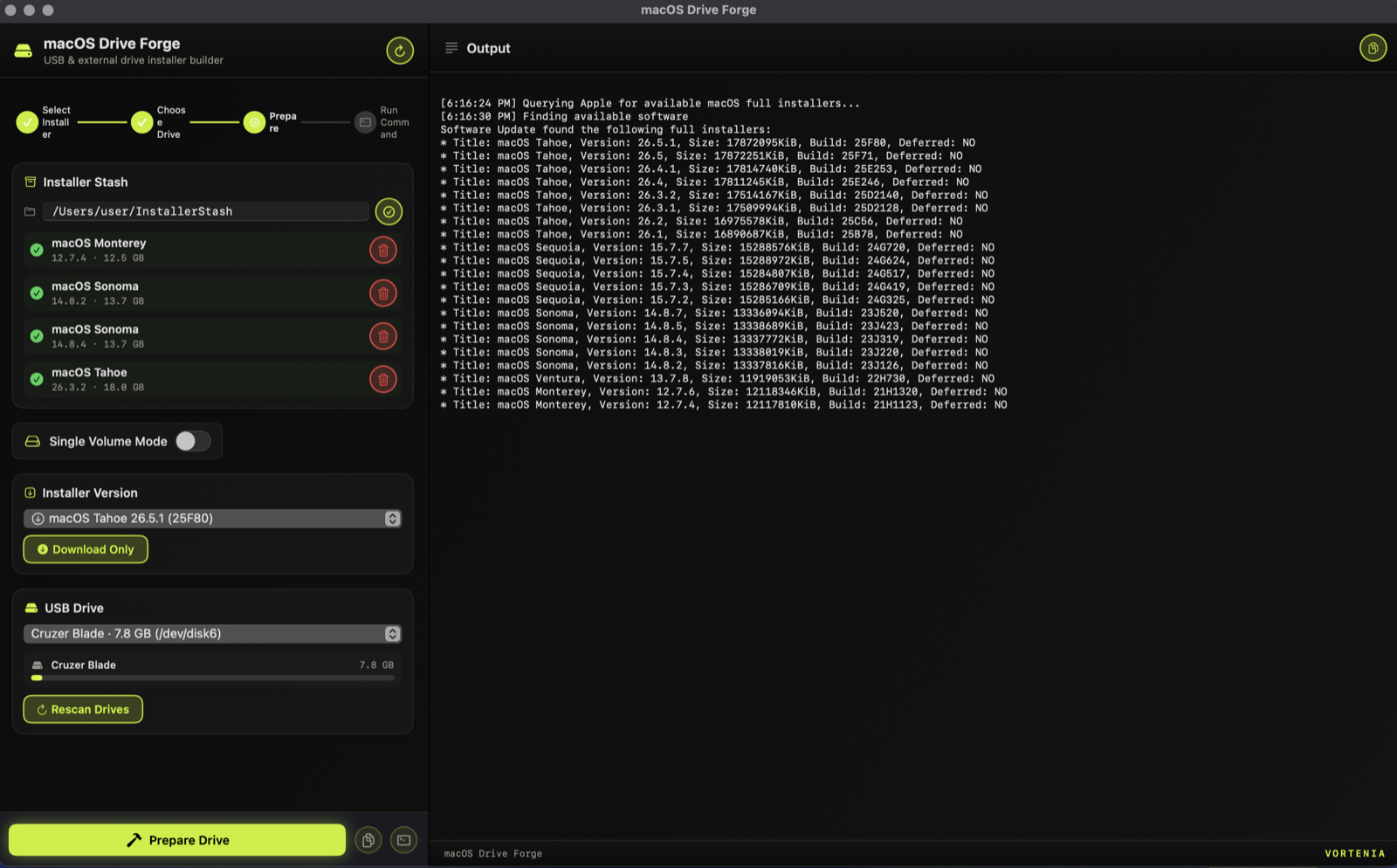
macOS Drive Forge
Free macOS utility for putting multiple installers on a
single USB stick or external drive.
macOS
A native macOS app for building bootable installer drives. Its
standout feature: it can place several macOS versions on one
drive, for example Sonoma, Sequoia, and Tahoe side by side, so a
single stick or external hard drive can reinstall or boot any of
them. It also handles the everyday single-installer job, without
making you memorize command-line flags.
Multi-version drives. Split one USB stick or external hard drive into several bootable volumes, one macOS version each.
Works with any external disk. USB flash drives, USB-C and Thunderbolt SSDs, and external hard drives. Bigger drives carry more installers at once.
Browse and download any Apple full installer straight from Apple, then keep a local stash so you never re-download.
Live progress and drive-capacity bars as each volume is built.
First launch: right-click the app and choose Open, then confirm (it is not yet notarized).
macOS 14 or later. An external USB stick or hard drive, 16 GB or
more per installer volume. Administrator access, since building a
drive erases it first.
01A local stash of macOS versions, with every full installer available from Apple.
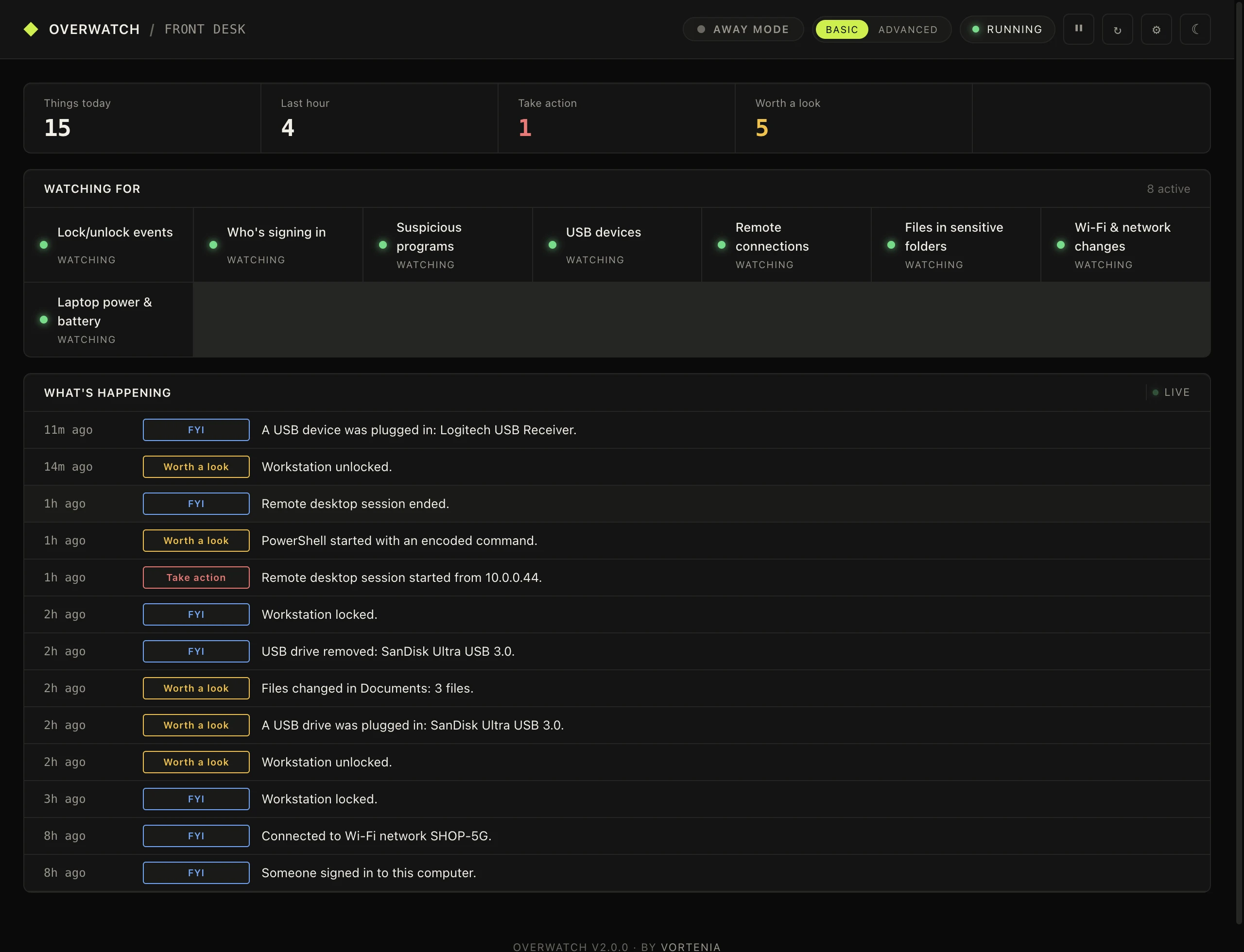
Overwatch
Real-time Windows security monitor with Telegram alerts.
Windows
A lightweight Windows utility built around one question: who or what
touched this computer, and when. Eight monitors watch logins, session
lock and unlock, processes, USB devices, remote access, network changes,
power, and sensitive files, and push alerts to Telegram instantly. A
local web dashboard shows the event feed in plain English.
Away Mode. One toggle when you step away; every snoop-relevant event escalates to critical and pings Telegram immediately.
Presence detection. Routine alerts stay quiet while you're actually at the keyboard. Auto, Quiet, and Loud modes.
Web dashboard. Local, plain-English event feed: "Someone signed in to this computer."
Windows 10 or 11. A single Overwatch.exe, no Python install needed.
Not code-signed: SmartScreen warns on first run, choose More info then Run anyway.
01The demo floor machine: eight monitors watching, a plain-English feed, Away Mode one click away.
Get new tools as they ship.
Vortenia releases tools from here. Leave your email and we'll tell you when the next one drops. No spam, just releases.
07 / The studio
Tools shaped by the work.
A lot of operational software gets designed by people who
don't run operations. It tends to look good in a
demo and struggle in practice.
Everything on this page came out of operations we run ourselves.
It was used internally first, refined on the floor, and shaped
by the work over time. That is the same way we build for clients:
starting from your workflow, not from a template.
Made for the hands that actually do the work. A scanner, a
few buttons, the right defaults already filled in. Easy
enough for a new hire's first shift, fast enough that nobody
else has to slow down for it.
You do. Custom builds are delivered with full source and documentation. No lock-in, no per-seat licenses, no rent on your own tool.
How fast is a typical build?
An Automation usually lands in one to two weeks, a System in three to six. You see working software early and often, not a reveal at the end.
What do you build with?
Whatever fits the job: web dashboards, station kiosks, barcode scanners, databases, integrations with tools you already run, and AI agents where they earn their keep. There is no platform you have to conform to.
Do we need to be technical to work with you?
No. You describe what you run and where the hours go, in plain language. Translating that into software is the job.
What happens after launch?
Every project includes post-launch support, 14 or 30 days depending on tier. After that, Keep It Running covers monitoring, updates, and small changes for $250 a month, or you take the keys and run it yourself.
What if we're not sure what we need?
Tell us what's slow. The scoping conversation is free, and we'll suggest the smallest version worth building, even if that turns out to be smaller than you expected.
09 / Station: contact · Operator: you
Tell us what's slow.
A few sentences about what you run and where the hours go.
We read everything and reply within one business day.
 Vortenia